
SMART TOURISM STARTS HERE · Smarter Rides, Better LivesRental Terms & Conditions ↗
YOUR CYCLEDIOS RIDING GUIDE

How to Unlock and Return Your Bicycle

Choose the guide that matches the lock on your bicycle. Videos are available in English, Bahasa Malaysia and Chinese. At ranger-assisted stations, ask the on-site team for help. Check prices and the return area before you start.

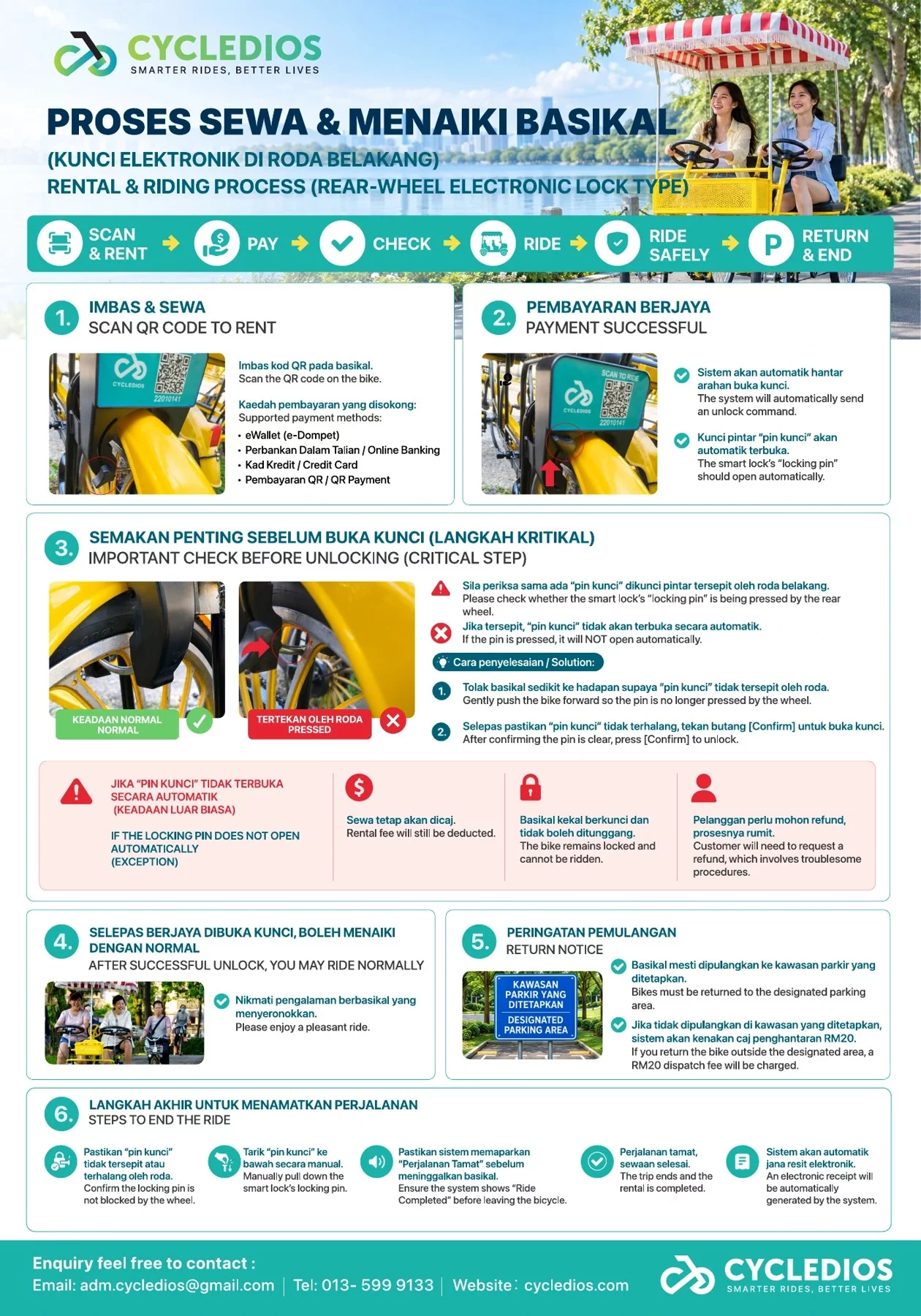
Rear-wheel electronic lock illustrated guide in English and Bahasa Malaysia
Rear-Wheel Electronic Lock — Unlock, return and confirm Ride Completed.
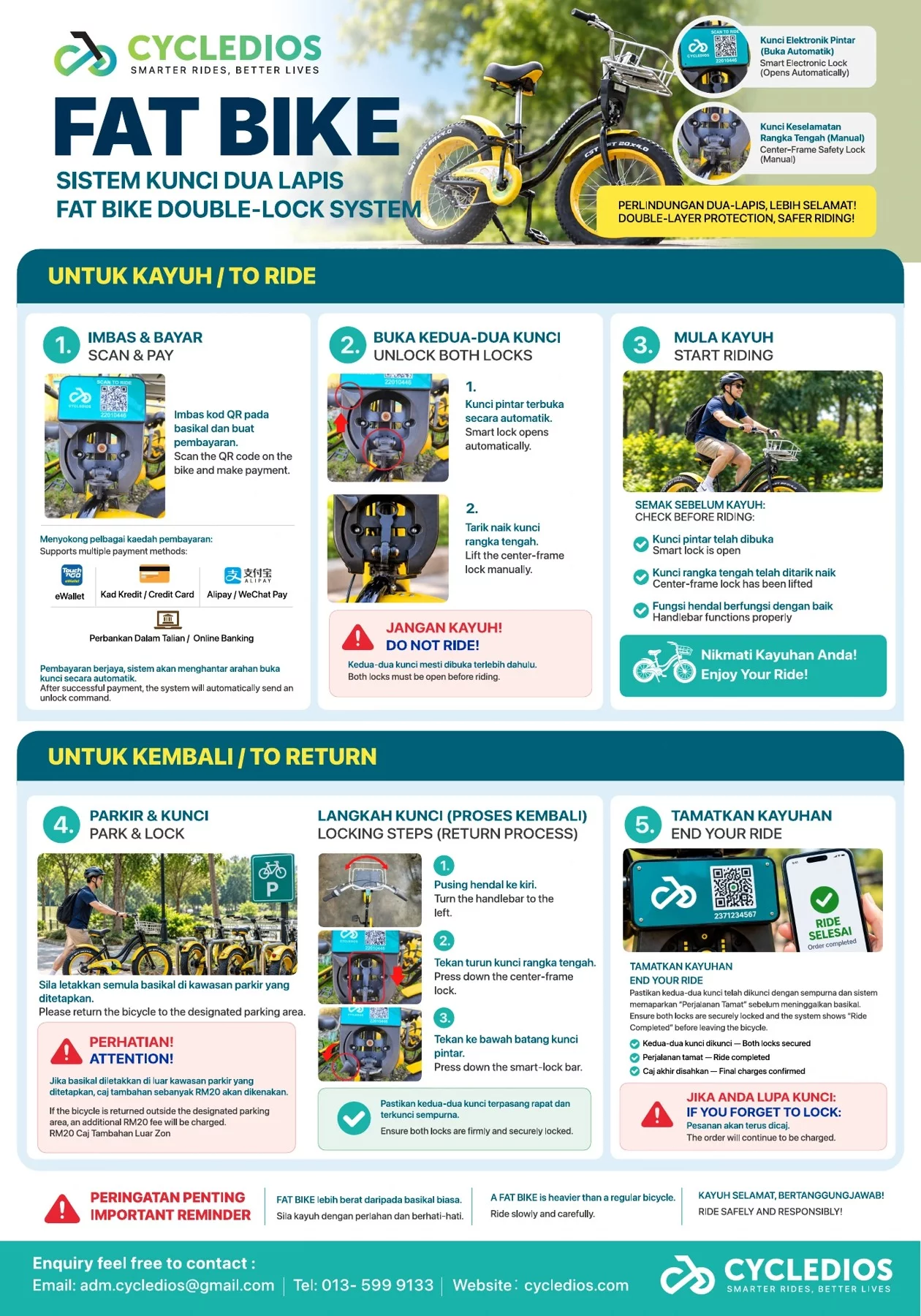
Fat Bike double-lock illustrated guide in English and Bahasa Malaysia
Fat Bike Double-Lock System — Secure both locks and confirm Ride Completed.
RANGER ASSISTED

A friendly face
to get you going.

A staff member helps you select a suitable bike and start your trip. When the ride ends and the lock is closed, you settle the actual usage.

Pay for actual usage.No three-block reservation in the ranger model.
  1. Find the ranger and check the bike, price and riding area.
  2. Follow the ranger’s instructions to start.
  3. Enjoy your ride within the location’s rules.
  4. Return, close the lock and settle your trip with the ranger.
SCAN TO RIDE

Your phone.
Your next adventure.

At an eligible bike, scan its QR code, enter your real rider details and review the price. Confirm the initial payment before following the unlock instructions.

Three blocks prepaid.Your final fare is settled from actual usage and applicable charges.
  1. Scan the code on the bike and check the bike details.
  2. Review the three-block prepayment, block length and applicable tax.
  3. Complete payment and follow the instructions for your lock type. For a rear-wheel electronic lock, check that the wheel is clear of the locking pin before confirming. For a Fat Bike with two locks, lift the manual centre-frame lock after the smart lock has opened. Start only when all locks are open.
  4. Return to designated parking. On a rear-wheel electronic lock, check the pin is clear of the wheel and pull it down manually. On a Fat Bike, turn the handlebar to align the lock, secure the centre-frame lock, then press down the smart-lock bar. Wait for Ride Completed on the rental screen.
THE DETAILS THAT MATTER

Clear from your first scan
to your final receipt.

Your selected bike’s checkout and local instructions are the place to confirm current prices and conditions.

Before you pay

Confirm the bike ID, the price per block, how long a block lasts and any applicable tax or location charges. Use your own real name and contact details so your ride and payment can be identified.

While you ride

Billing follows the ride rules shown for your selected service. Keep your order reference and use the service to review your trip. If the physical lock does not open, check the existing order before paying again.

When you finish

Return the bicycle to the designated parking area and secure all locks. Wait for Ride Completed on the rental screen, then review your final charges and electronic receipt before leaving. Use the illustrated guides and the language-specific tutorial buttons below.

PREPAYMENT IS NOT YOUR FINAL FARE

Unused value.
Clearly accounted for.

For Scan to Ride, the initial payment covers three blocks. At the end of your ride, the service calculates the fare and applicable charges. Unused prepaid value enters the refund process; if the final charges exceed the prepaid value, an additional balance may be payable.

A requested or pending refund is not the same as a completed refund. Check the receipt status and keep the payment reference. Bank and payment-provider processing can affect when returned funds appear.

Campus passes, wallet arrangements and institution-specific rules should be checked in the campus service. Do not apply a recreation-bike example to a different programme.

More about payments and refunds →
SOMETHING DOESN’T LOOK RIGHT?

Video Tutorials & Riding Support

Keep the bike ID, order reference, location and time. If you are at a staffed venue, speak with the ranger first.

Get riding support ↗Fat Bike Double Lock · Bahasa MalaysiaFat Bike Double Lock · EnglishFat Bike Double Lock · 中文Rear-Wheel Lock · Bahasa MalaysiaRear-Wheel Lock · EnglishRear-Wheel Lock · 中文
A LITTLE MORE OUTDOORS

Smarter Rides, Better Lives

Find your riding spot

SMART TOURISM STARTS HERE. Find your next outdoor experience with CycleDios.